Use your Claude or ChatGPT
Mika runs as an MCP server. Drive it from Claude Desktop, Claude Code or Codex (ChatGPT) with your own subscription and the same tools.
Cost: your subscription
From idea to sketch.
Your co-producer for Ableton Live.
Coming soon for macOS and Windows. €99, or €79 when you join the waitlist.
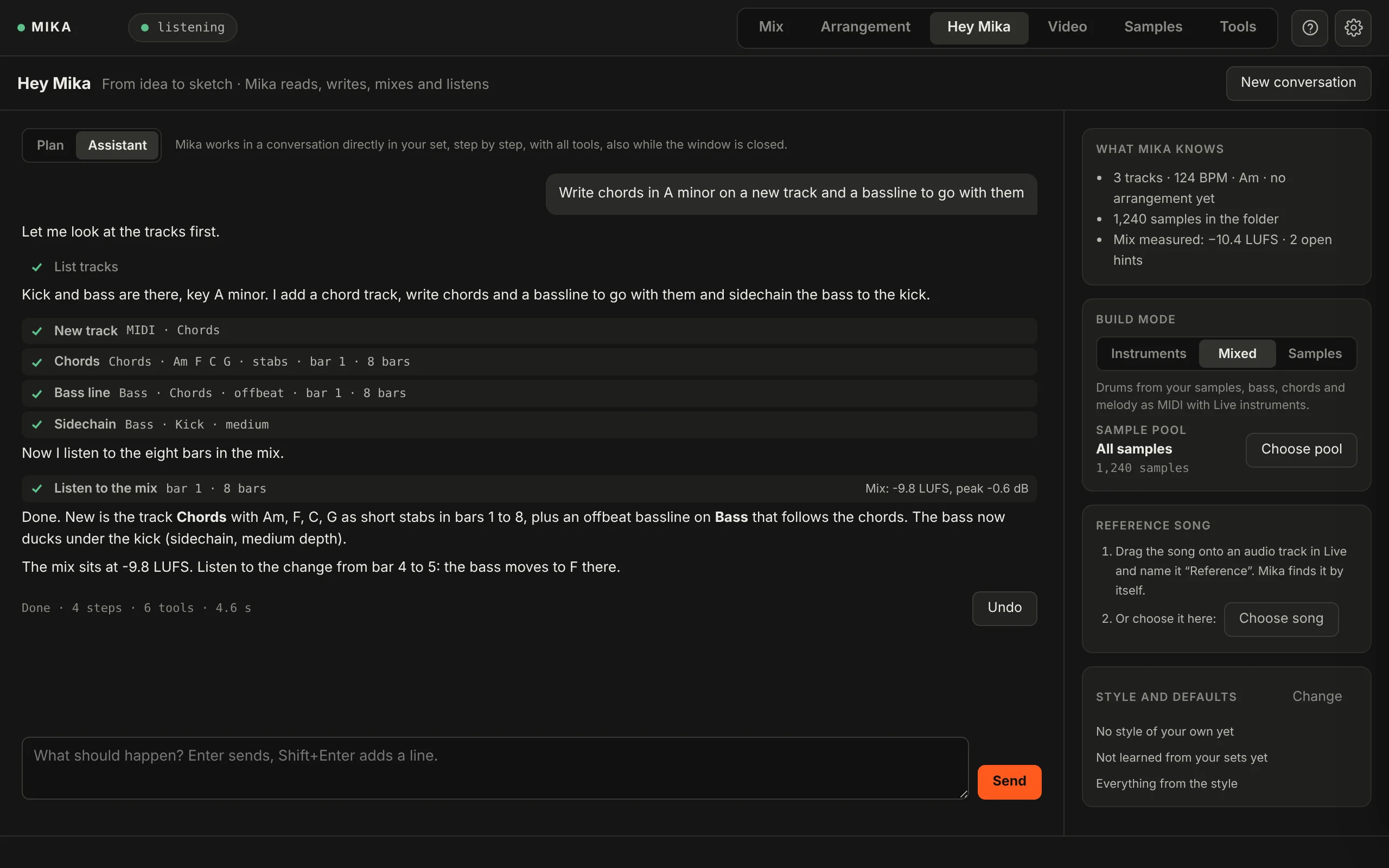
Mika sits on your master track and listens. It checks your mix and arrangement, knows your samples and turns one sentence into a sketch in your set: tracks, sounds, notes, structure and a first mix. You take it from there.
Name a genre and a mood. Mika reads your set, writes the parts, loads the sounds, mixes and listens back. You see every step, and one click undoes the whole request.
Assistant or Plan. Use the Assistant and Mika works right in your set as you chat. Or start with a Plan: Mika lays out tracks, sounds and structure, you tweak it, then Mika builds it.
Your sounds. Live’s instruments, your own samples or both. Mika can even use the racks in your User Library.
Your style. Mika reads your Live sets and learns your groove, velocity, timing, swing and go-to sounds. Each new track still comes out different from the last.
After 15 seconds, the first hints show up, each pinned to a bar and a track.
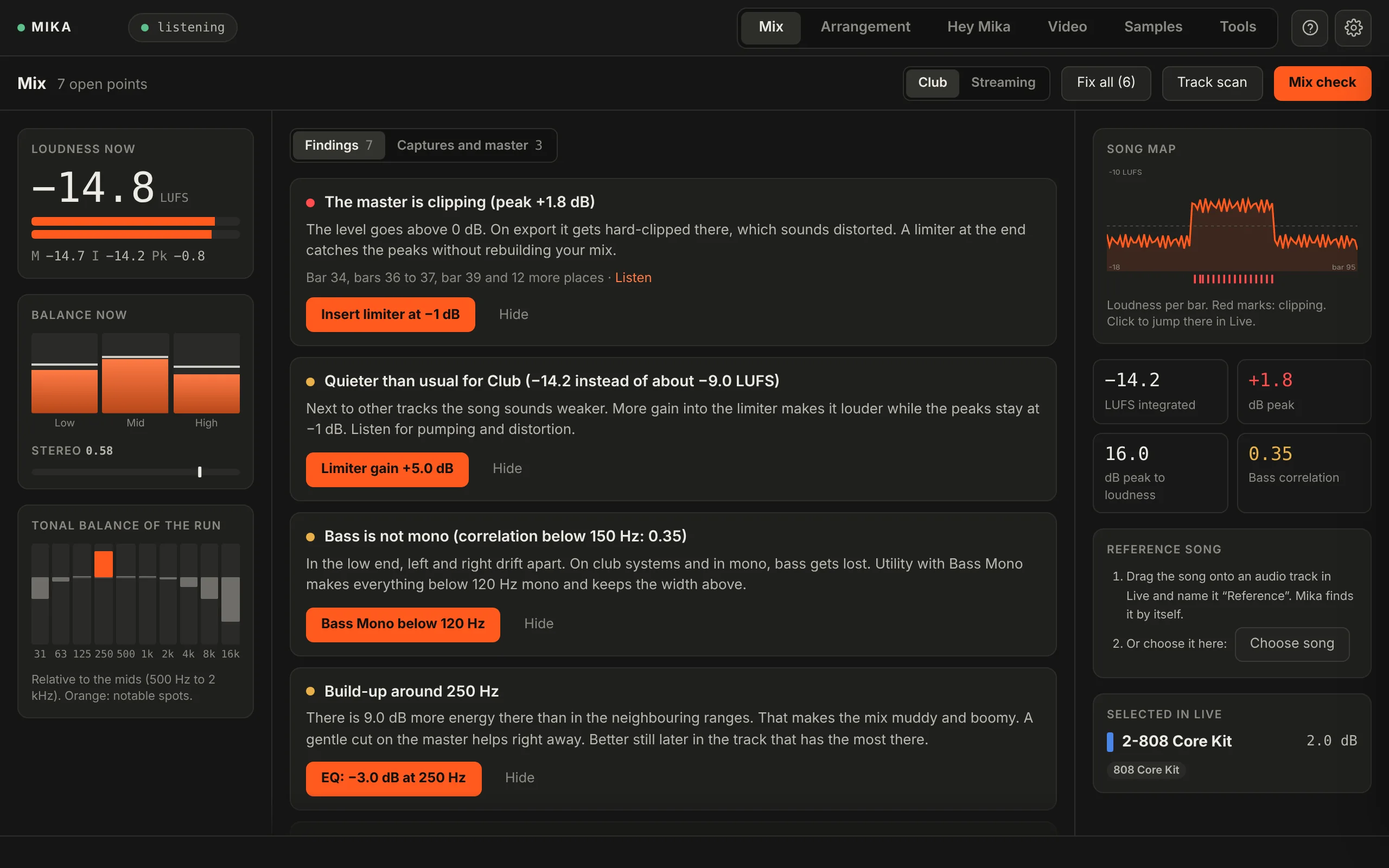
Full mix check. Mika plays your whole song once and measures loudness, peaks, tonal balance and stereo image.
Track by track. Like a soundcheck: Mika solos each track for a moment and shows which one causes which problem.
One-click fixes. Many hints come with a fix that uses Live’s own devices, like “Insert limiter at −1 dB”. Then compare before and after, or undo it.
Fair comparisons. Two captures, or your mix and a reference track, play at the same loudness. So louder doesn’t win by default.
Mika reads your song’s structure: the sections, who plays when, how loud it gets. Then it checks whether the tension builds, the drops hit and a DJ can mix your track cleanly.
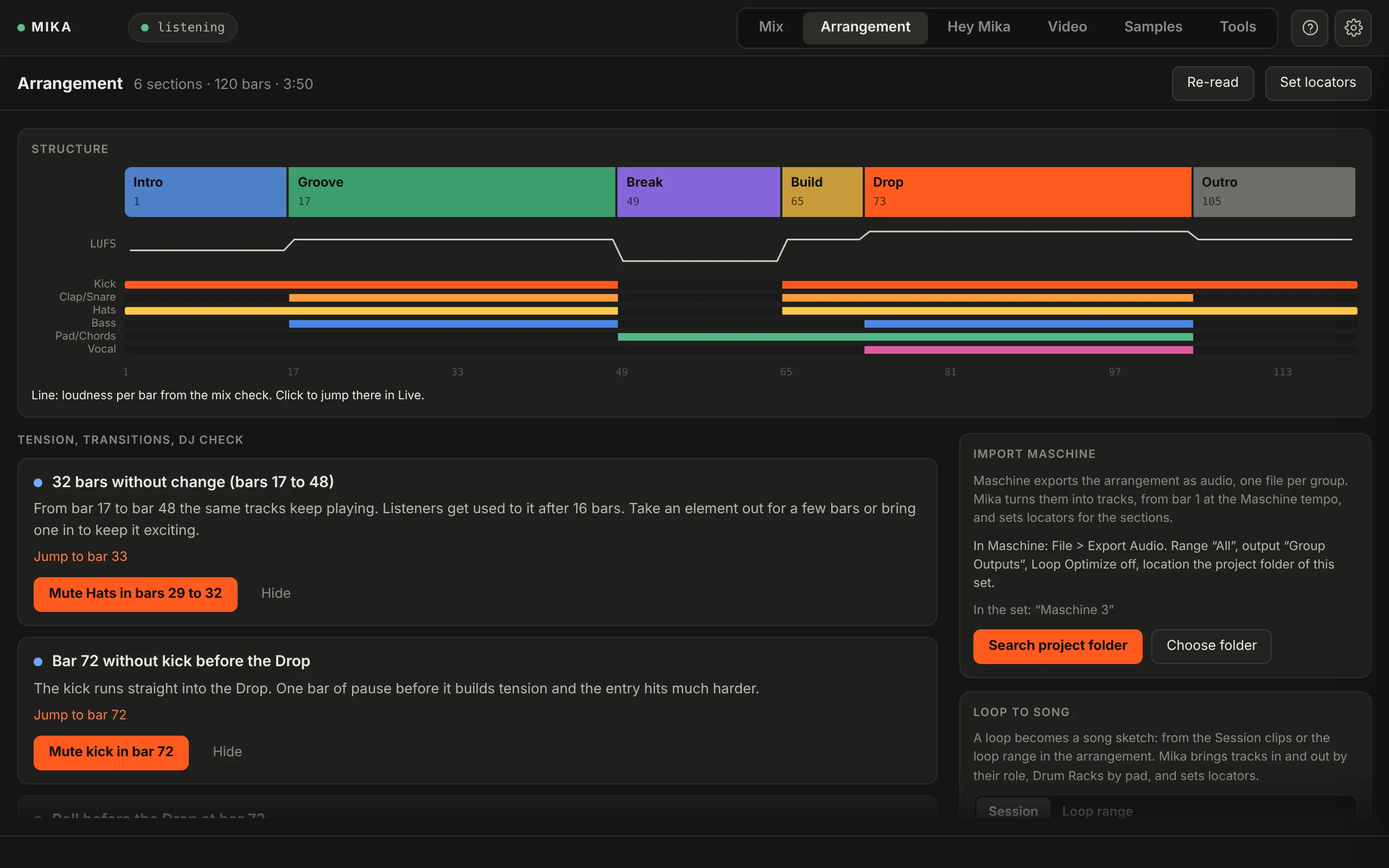
Fixed for you. Some things Mika just does, like “Mute kick in bar 72” or a roll into the drop.
From loop to song. Clips from Session View or your loop range become a song sketch: a club tool, a radio edit or an extended mix. Nothing gets overwritten.
From Maschine. A Maschine song lands in your arrangement as audio tracks, from bar 1, at Maschine’s tempo, with locators for every section.
For reels, clips and ads. Mika watches your video frame by frame and builds the music in Live, in sync on its own track.
Tempo from the cuts. Mika picks the tempo that lands as many cuts as possible on a downbeat.
Hits the key moments. Mark the moments that matter, or take Mika’s suggestions. Once the plan is ready, Mika shows whether the music hits each one.
Works without AI, too. Choose “Without Claude” and Mika plans the music on its own, from motion, color, cuts and sound, for free.
QuickTime (.mov), MP4 and M4V, up to 10 minutes.
Mika listens to your sample folder and sorts everything by type, key, tempo and length. Then you search the way you’d describe the sound.
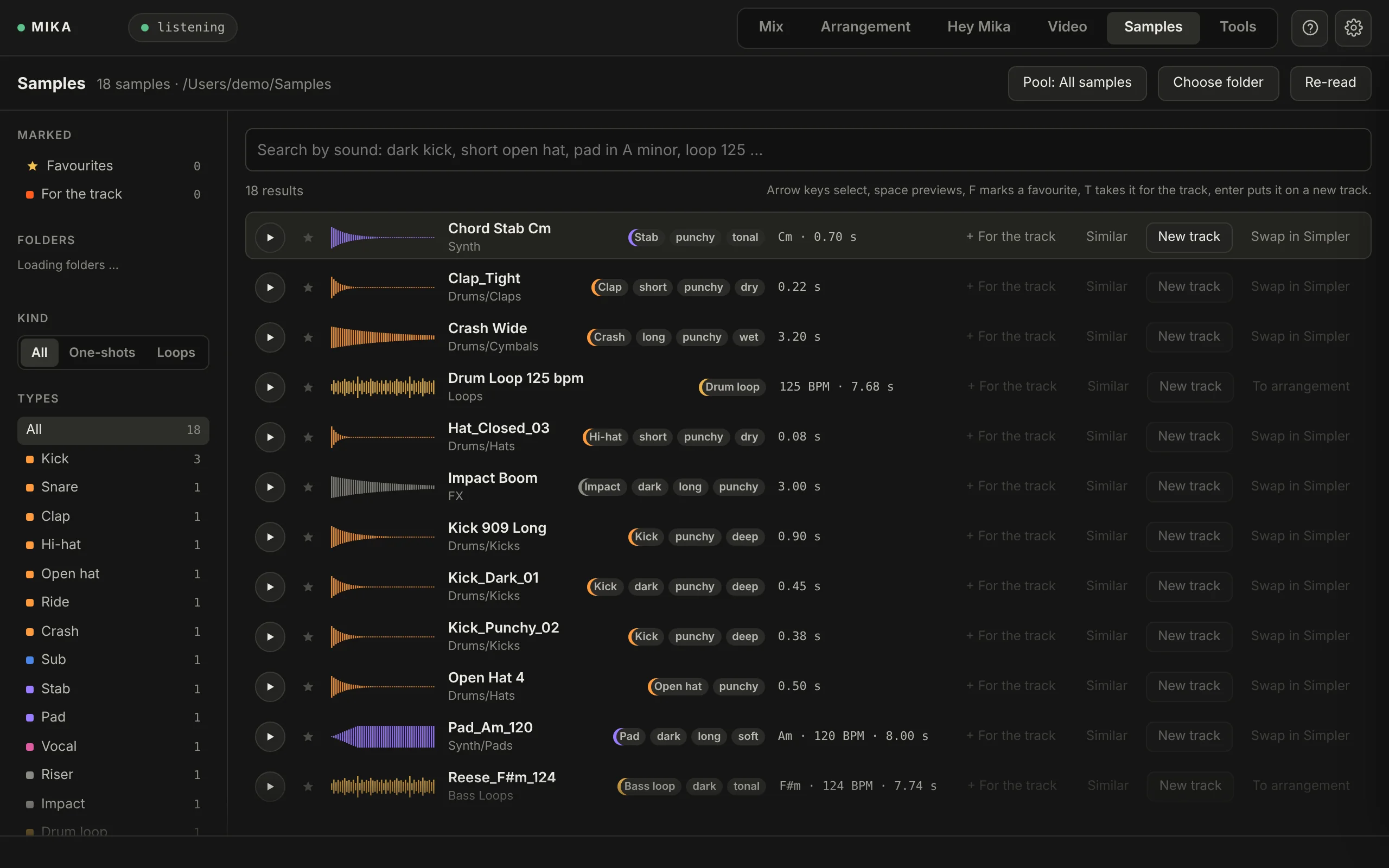
Save them for later. Pick up to 24 samples for a track, and Hey Mika puts them in the right roles next time.
More like this. For any sample, Mika finds the ones that sound similar.
Straight into Live. Drop it on a new track, into the arrangement as a loop, or into a Simpler that’s already in your set.
Hey Mika and music for video run on Claude, an AI by Anthropic. Mix, arrangement, samples and tools work right on your computer, no AI involved.
Mika runs as an MCP server. Drive it from Claude Desktop, Claude Code or Codex (ChatGPT) with your own subscription and the same tools.
Cost: your subscription
Requests go straight to Anthropic. Mika shows what a request typically costs, and below each one what it actually cost.
Cost: pay as you go at Anthropic
No Anthropic account needed. A request costs one credit, very long ones can cost more. Mika comes with 10 credits.
Cost: one credit per request
With each request, Mika sends the AI a description of your set and what you asked for, plus still frames for video. Your audio files and samples stay on your computer.
Waitlist price: €79 instead of €99.
Mika is almost here. Join the waitlist and we’ll email you at launch with your waitlist price.
Try it free for 14 days. Everything’s unlocked, plus 3 Mika credits to play with.
You only need credits if you don’t use your own Claude or ChatGPT subscription or your own API key.
No, it gives you a sketch: tracks, sounds, notes, structure and a first mix, all as regular Live tracks you can edit. Finishing the track is up to you.
No. Mika doesn’t generate audio. The sketch is built from MIDI notes, Live’s instruments and your own samples, all as regular tracks in your set. Mika suggests the structure, the parts and a first mix. You change them, play your own parts and turn it into your track. The decisions and the sound are yours.
No. The plugin runs in Live Intro, Standard and Suite, version 12.3 or later. Only the Max for Live device needs Suite.
That depends on how you connect the AI. With your own Claude or ChatGPT subscription, you talk to Mika from Claude Desktop, Claude Code or Codex instead of the Hey Mika tab, at no extra cost. With your own Anthropic API key, you pay Anthropic for what you use, and Mika shows the cost below each request. Without either, you use Mika credits from us: a request costs one credit, very long ones with more than 12 steps cost two or three. Mika comes with 10 credits. Mix, arrangement, samples and tools don’t use AI and cost nothing.
No. ChatGPT connects to Mika through Codex on your computer, Claude through Claude Desktop or Claude Code. The connection only works from your own computer and is secured with a key.
A description of your set (tracks, clips and notes, devices, tempo, key, sections, mix readings, sample names) and your request, plus still frames for video. Your audio files and samples stay on your computer.
Yes. You get 14 days with everything unlocked, plus 3 Mika credits. Enter your email in Mika and we’ll send you a link that unlocks your computer.
Mix, arrangement, samples and tools do. Hey Mika needs a connection to the AI. Mika checks your license online now and then and keeps working offline for 30 days.
Almost everything, in one click: on the hint, below the request or in the history in the Tools tab. And before Mika deletes anything, it asks.
One license covers 2 computers. Switching machines? Release the old one in Mika or in your account.